# A tibble: 935 × 26
      id firstname   surname  year category affiliation city  country born_date
   <dbl> <chr>       <chr>   <dbl> <chr>    <chr>       <chr> <chr>   <date>
 1     1 Wilhelm Co… Röntgen  1901 Physics  Munich Uni… Muni… Germany 1845-03-27
 2     2 Hendrik A.  Lorentz  1902 Physics  Leiden Uni… Leid… Nether… 1853-07-18
 3     3 Pieter      Zeeman   1902 Physics  Amsterdam … Amst… Nether… 1865-05-25
 4     4 Henri       Becque…  1903 Physics  École Poly… Paris France  1852-12-15
 5     5 Pierre      Curie    1903 Physics  École muni… Paris France  1859-05-15
 6     6 Marie       Curie    1903 Physics  <NA>        <NA>  <NA>    1867-11-07
 7     6 Marie       Curie    1911 Chemist… Sorbonne U… Paris France  1867-11-07
 8     8 Lord        Raylei…  1904 Physics  Royal Inst… Lond… United… 1842-11-12
 9     9 Philipp     Lenard   1905 Physics  Kiel Unive… Kiel  Germany 1862-06-07
10    10 J.J.        Thomson  1906 Physics  University… Camb… United… 1856-12-18
# ℹ 925 more rows
# ℹ 17 more variables: died_date <date>, gender <chr>, born_city <chr>,
#   born_country <chr>, born_country_code <chr>, died_city <chr>,
#   died_country <chr>, died_country_code <chr>, overall_motivation <chr>,
#   share <dbl>, motivation <chr>, born_country_original <chr>,
#   born_city_original <chr>, died_country_original <chr>,
# died_city_original <chr>, city_original <chr>, country_original <chr>05 - Importation et jointure de données
PRO1036 - Analyse de données scientifiques en R
Tim Bollé
October 17, 2025
Importation de données
Présentations


readr
- read_csv() - fichiers CSV
- CSV: comma-separated values - valeurs séparées par des virgules
- read_csv2() - fichiers CSV mais où le séparateur est un point-virgule
- Commun dans les pays où le séparateur décimal est la virgule
- read_tsv() - fichiers TSV
- TSV: tab-separated values - valeurs séparées par des tabulations
- read_delim() - fichiers avec un délimiteur spécifique
- On peut spécifier le délimiteur avec l’argument
delim
- On peut spécifier le délimiteur avec l’argument
- …
readxl
- read_excel() - Permet de lire des fichiers Excel
Lecture de fichiers
Noms des varaibles
Le nom des variables n’est pas toujours optimal.
 [1] "ID"                   "Price"                "neighbourhood"
 [4] "accommodates"         "Number of bathrooms"  "Number of Bedrooms"
 [7] "n beds"               "Review Scores Rating" "Number of reviews"
[10] "listing_url"
Et R n’aime pas les noms de variables avec des espaces.
Option 1: Spécifier les noms des variables à l’importation
edibnb_col_names <- read_csv("data/edibnb-badnames.csv",
                             col_names = c("id", "price",
                                           "neighbourhood", "accommodates",
                                           "bathroom", "bedroom",
                                           "bed", "review_scores_rating",
                                           "n_reviews", "url"))
names(edibnb_col_names)
[1] "id" "price" "neighbourhood"
[4] "accommodates" "bathroom" "bedroom"
[7] "bed" "review_scores_rating" "n_reviews"
[10] "url" Option 2: Utiliser le format snake_case
- Les espaces sont remplacés par des underscores
- Les lettres sont en minuscules
Nous pouvons utiliser la fonction janitor::clean_names()
Gestion des types de données
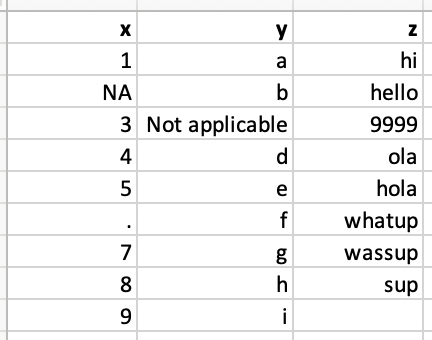
Spécification des NAs
Spécification des types de chaque colonne
Les types de colonnes
| Fonction | Types de données |
|---|---|
col_character() |
Chaine de caractères |
col_date() |
Date |
col_datetime() |
POSIXct (date-time) |
col_double() |
Double (numeric) |
col_factor() |
Factor |
col_guess() |
Laisse readr deviner ( par défaut) |
col_integer() |
Entier |
col_logical() |
Logique |
col_number() |
Nombre et texte mélangés |
col_numeric() |
Double ou entier |
col_skip() |
Ne pas lire la colonne |
col_time() |
Temps |
Jointure de données
Kesako
Lorsque nous avons des données dans plusieurs fichiers/tables, il est souvent nécessaire de les combiner.
Données: Les femmes dans la science
Nous avons des informations sur 10 femmes qui ont changé le monde. Les informations sont réparties dans trois fichiers:
professions.csv: Information sur la profession de chacunedates.csv: date de naissance et de décès de chacuneworks.csv: Ce qu’elles ont fait pour changer le monde
professions.csv
# A tibble: 10 × 2
   name               profession
   <chr>              <chr>
 1 Ada Lovelace       Mathematician
 2 Marie Curie        Physicist and Chemist
 3 Janaki Ammal       Botanist
 4 Chien-Shiung Wu    Physicist
 5 Katherine Johnson  Mathematician
 6 Rosalind Franklin  Chemist
 7 Vera Rubin         Astronomer
 8 Gladys West        Mathematician
 9 Flossie Wong-Staal Virologist and Molecular Biologist
10 Jennifer Doudna    Biochemist
dates.csv
# A tibble: 8 × 3
  name               birth_year death_year
  <chr>                   <dbl>      <dbl>
1 Janaki Ammal             1897       1984
2 Chien-Shiung Wu          1912       1997
3 Katherine Johnson        1918       2020
4 Rosalind Franklin        1920       1958
5 Vera Rubin               1928       2016
6 Gladys West              1930         NA
7 Flossie Wong-Staal       1947         NA
8 Jennifer Doudna          1964         NA
works.csv
# A tibble: 9 × 2
  name               known_for
  <chr>              <chr>
1 Ada Lovelace       first computer algorithm
2 Marie Curie        theory of radioactivity,  discovery of elements polonium a…
3 Janaki Ammal       hybrid species, biodiversity protection
4 Chien-Shiung Wu    confim and refine theory of radioactive beta decy, Wu expe…
5 Katherine Johnson  calculations of orbital mechanics critical to sending the …
6 Vera Rubin         existence of dark matter
7 Gladys West        mathematical modeling of the shape of the Earth which serv…
8 Flossie Wong-Staal first scientist to clone HIV and create a map of its genes…
9 Jennifer Doudna    one of the primary developers of CRISPR, a ground-breaking…
Ce que nous voulons comme output
# A tibble: 10 × 5
   name               profession                 birth_year death_year known_for
   <chr>              <chr>                           <dbl>      <dbl> <chr>
 1 Ada Lovelace       Mathematician                      NA         NA first co…
 2 Marie Curie        Physicist and Chemist              NA         NA theory o…
 3 Janaki Ammal       Botanist                         1897       1984 hybrid s…
 4 Chien-Shiung Wu    Physicist                        1912       1997 confim a…
 5 Katherine Johnson  Mathematician                    1918       2020 calculat…
 6 Rosalind Franklin  Chemist                          1920       1958 <NA>
 7 Vera Rubin         Astronomer                       1928       2016 existenc…
 8 Gladys West        Mathematician                    1930         NA mathemat…
 9 Flossie Wong-Staal Virologist and Molecular …       1947         NA first sc…
10 Jennifer Doudna    Biochemist                       1964         NA one of t…
Types de jointures
left_join(): Retourne toutes les lignes de la première table et les lignes correspondantes de la deuxième tableright_join(): Retourne toutes les lignes de la deuxième table et les lignes correspondantes de la première tableinner_join(): Retourne les lignes qui ont une correspondance dans les deux tablesfull_join(): Retourne toutes les lignes des deux tablessemi_join(): Retourne toutes les lignes de la première table qui ont une correspondance dans la deuxième tableanti_join(): Retourne toutes les lignes de la première table qui n’ont pas de correspondance dans la deuxième table
Pour l’exemple…
left_join()
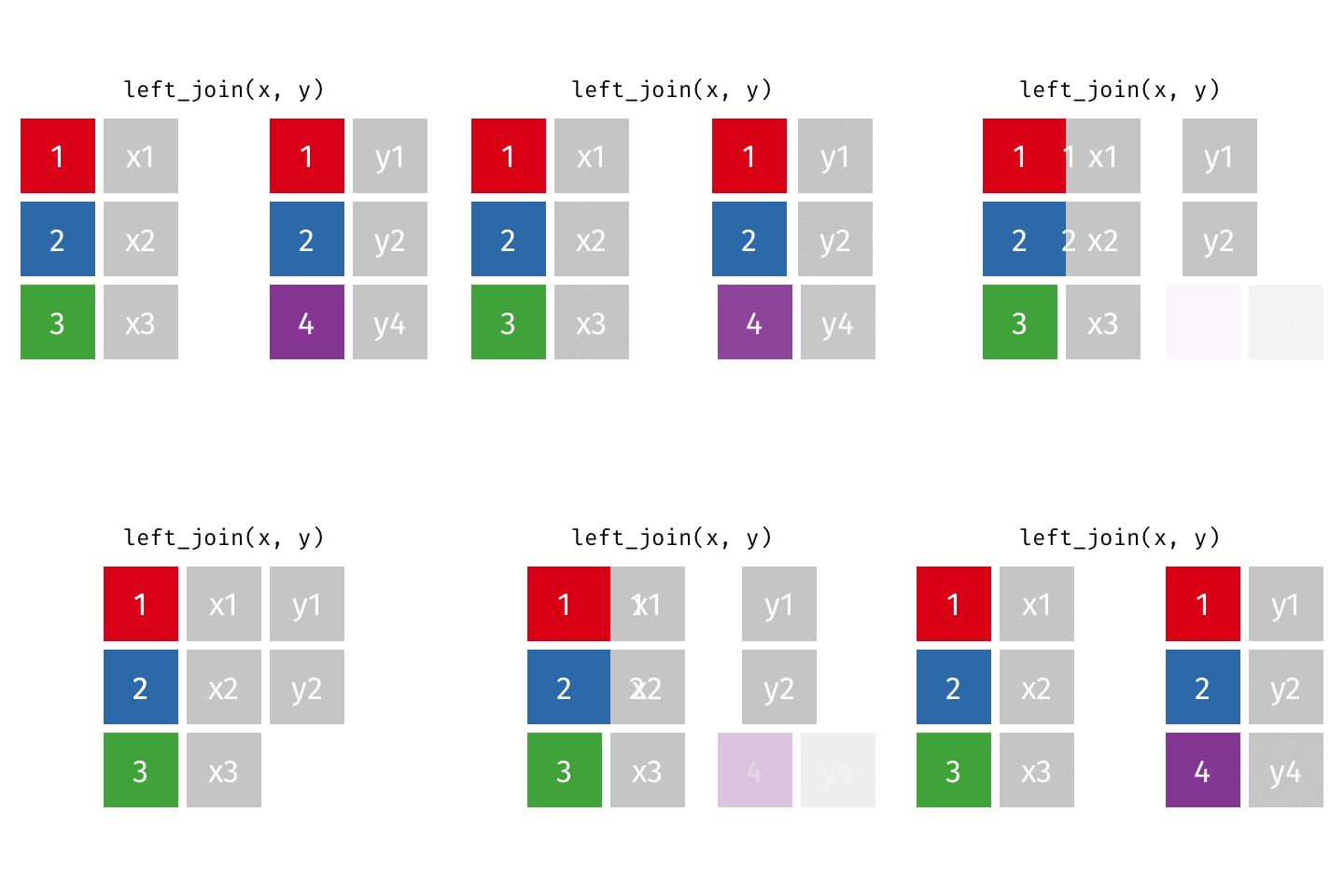
left_join()
# A tibble: 10 × 4
   name               profession                         birth_year death_year
   <chr>              <chr>                                   <dbl>      <dbl>
 1 Ada Lovelace       Mathematician                              NA         NA
 2 Marie Curie        Physicist and Chemist                      NA         NA
 3 Janaki Ammal       Botanist                                 1897       1984
 4 Chien-Shiung Wu    Physicist                                1912       1997
 5 Katherine Johnson  Mathematician                            1918       2020
 6 Rosalind Franklin  Chemist                                  1920       1958
 7 Vera Rubin         Astronomer                               1928       2016
 8 Gladys West        Mathematician                            1930         NA
 9 Flossie Wong-Staal Virologist and Molecular Biologist       1947         NA
10 Jennifer Doudna    Biochemist                               1964         NA
right_join()
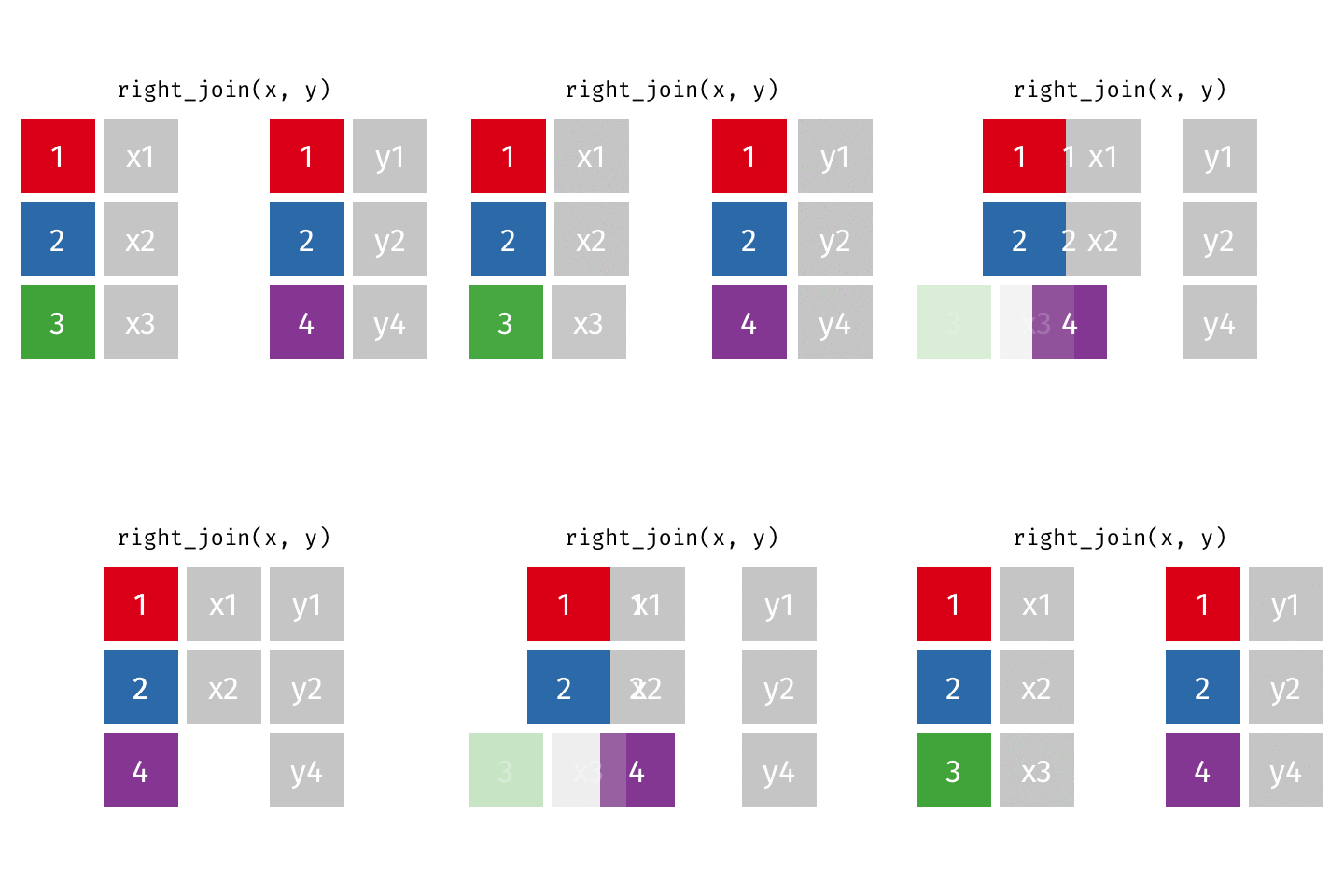
right_join()
# A tibble: 8 × 4
  name               profession                         birth_year death_year
  <chr>              <chr>                                   <dbl>      <dbl>
1 Janaki Ammal       Botanist                                 1897       1984
2 Chien-Shiung Wu    Physicist                                1912       1997
3 Katherine Johnson  Mathematician                            1918       2020
4 Rosalind Franklin  Chemist                                  1920       1958
5 Vera Rubin         Astronomer                               1928       2016
6 Gladys West        Mathematician                            1930         NA
7 Flossie Wong-Staal Virologist and Molecular Biologist       1947         NA
8 Jennifer Doudna    Biochemist                               1964         NA
full_join()
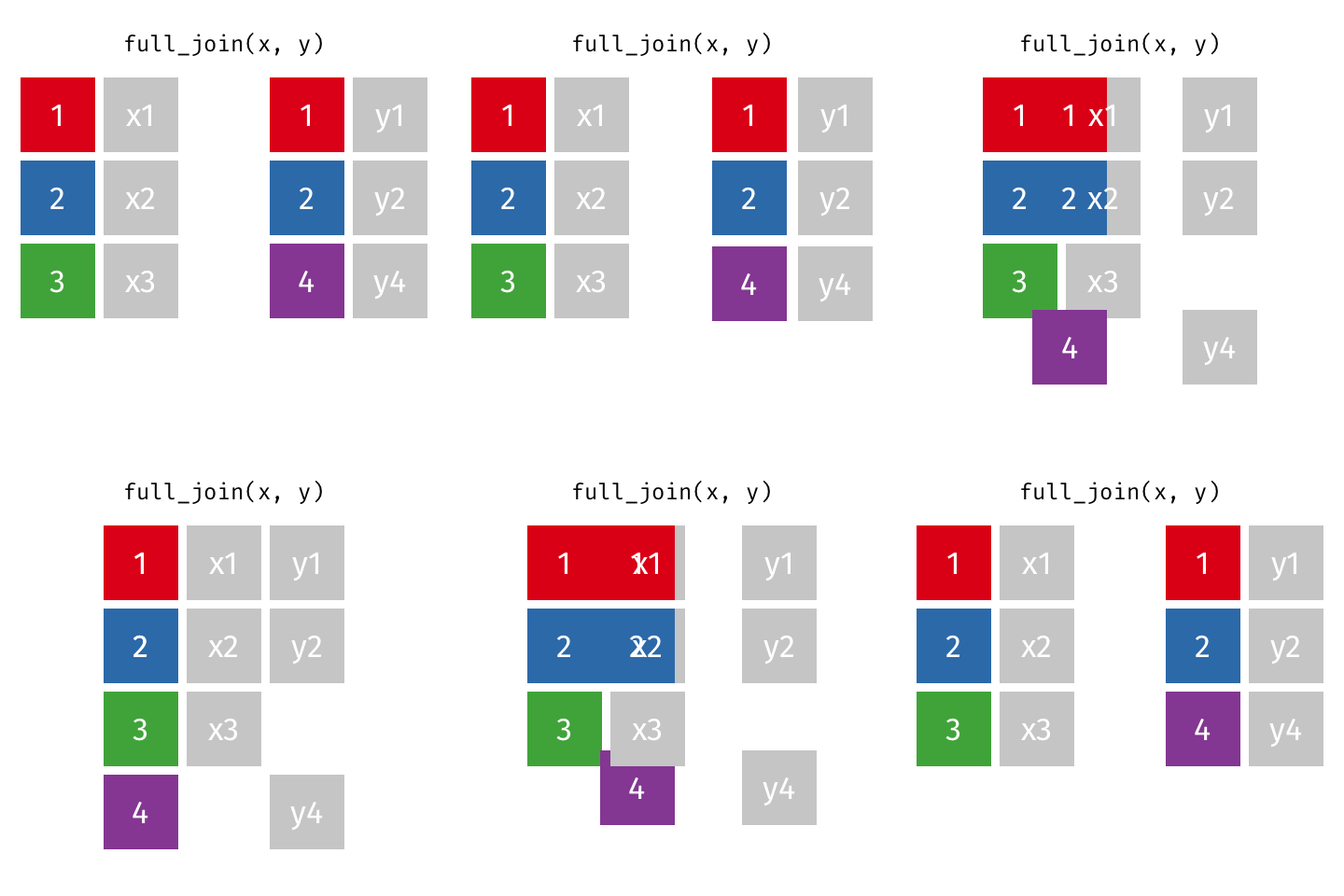
full_join()
# A tibble: 10 × 3
   name               profession                         known_for
   <chr>              <chr>                              <chr>
 1 Ada Lovelace       Mathematician                      first computer algorit…
 2 Marie Curie        Physicist and Chemist              theory of radioactivit…
 3 Janaki Ammal       Botanist                           hybrid species, biodiv…
 4 Chien-Shiung Wu    Physicist                          confim and refine theo…
 5 Katherine Johnson  Mathematician                      calculations of orbita…
 6 Rosalind Franklin  Chemist                            <NA>
 7 Vera Rubin         Astronomer                         existence of dark matt…
 8 Gladys West        Mathematician                      mathematical modeling …
 9 Flossie Wong-Staal Virologist and Molecular Biologist first scientist to clo…
10 Jennifer Doudna    Biochemist                         one of the primary dev…
inner_join()
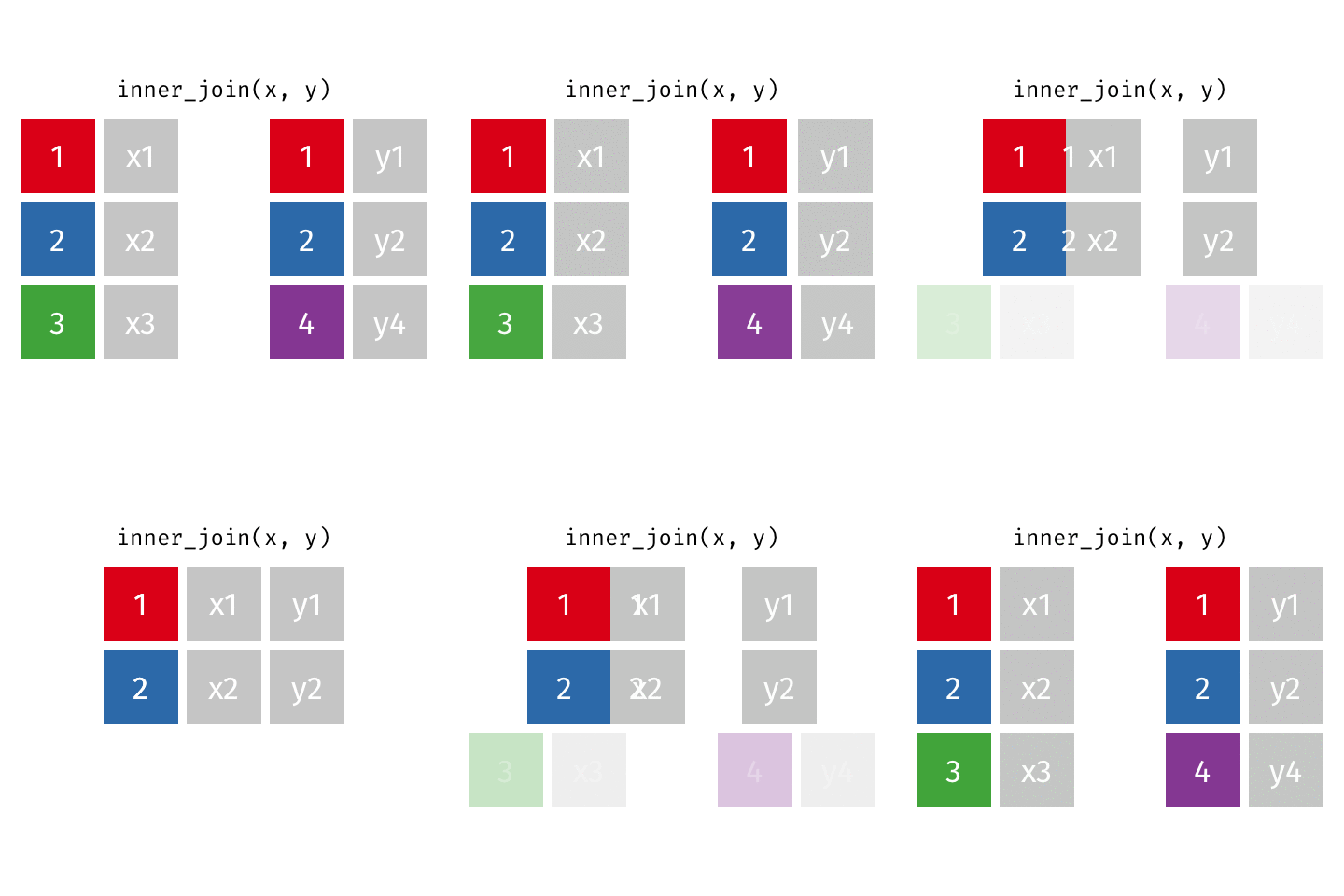
inner_join()
# A tibble: 8 × 4
  name               profession                         birth_year death_year
  <chr>              <chr>                                   <dbl>      <dbl>
1 Janaki Ammal       Botanist                                 1897       1984
2 Chien-Shiung Wu    Physicist                                1912       1997
3 Katherine Johnson  Mathematician                            1918       2020
4 Rosalind Franklin  Chemist                                  1920       1958
5 Vera Rubin         Astronomer                               1928       2016
6 Gladys West        Mathematician                            1930         NA
7 Flossie Wong-Staal Virologist and Molecular Biologist       1947         NA
8 Jennifer Doudna    Biochemist                               1964         NA
Si on reprend…
# A tibble: 10 × 5
   name               profession                 birth_year death_year known_for
   <chr>              <chr>                           <dbl>      <dbl> <chr>
 1 Ada Lovelace       Mathematician                      NA         NA first co…
 2 Marie Curie        Physicist and Chemist              NA         NA theory o…
 3 Janaki Ammal       Botanist                         1897       1984 hybrid s…
 4 Chien-Shiung Wu    Physicist                        1912       1997 confim a…
 5 Katherine Johnson  Mathematician                    1918       2020 calculat…
 6 Rosalind Franklin  Chemist                          1920       1958 <NA>
 7 Vera Rubin         Astronomer                       1928       2016 existenc…
 8 Gladys West        Mathematician                    1930         NA mathemat…
 9 Flossie Wong-Staal Virologist and Molecular …       1947         NA first sc…
10 Jennifer Doudna    Biochemist                       1964         NA one of t…
Tidy data
Tidy data
Happy families are all alike; every unhappy family is unhappy in its own way. – Leo Tolstoy
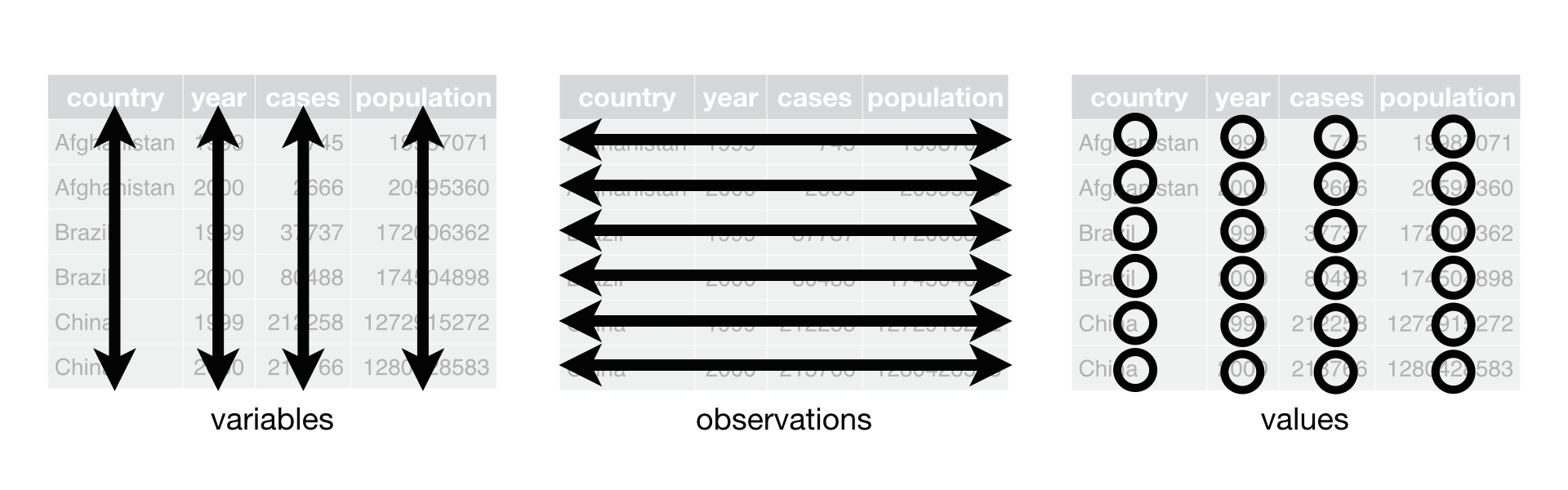
Qu’est ce que des données Tidy ?
- Chaque variable est une colonne
- Chaque observation est une ligne
- Chaque valeur est une cellule
Tidy data
Exemples
En quoi ces données ne sont pas tidy ?
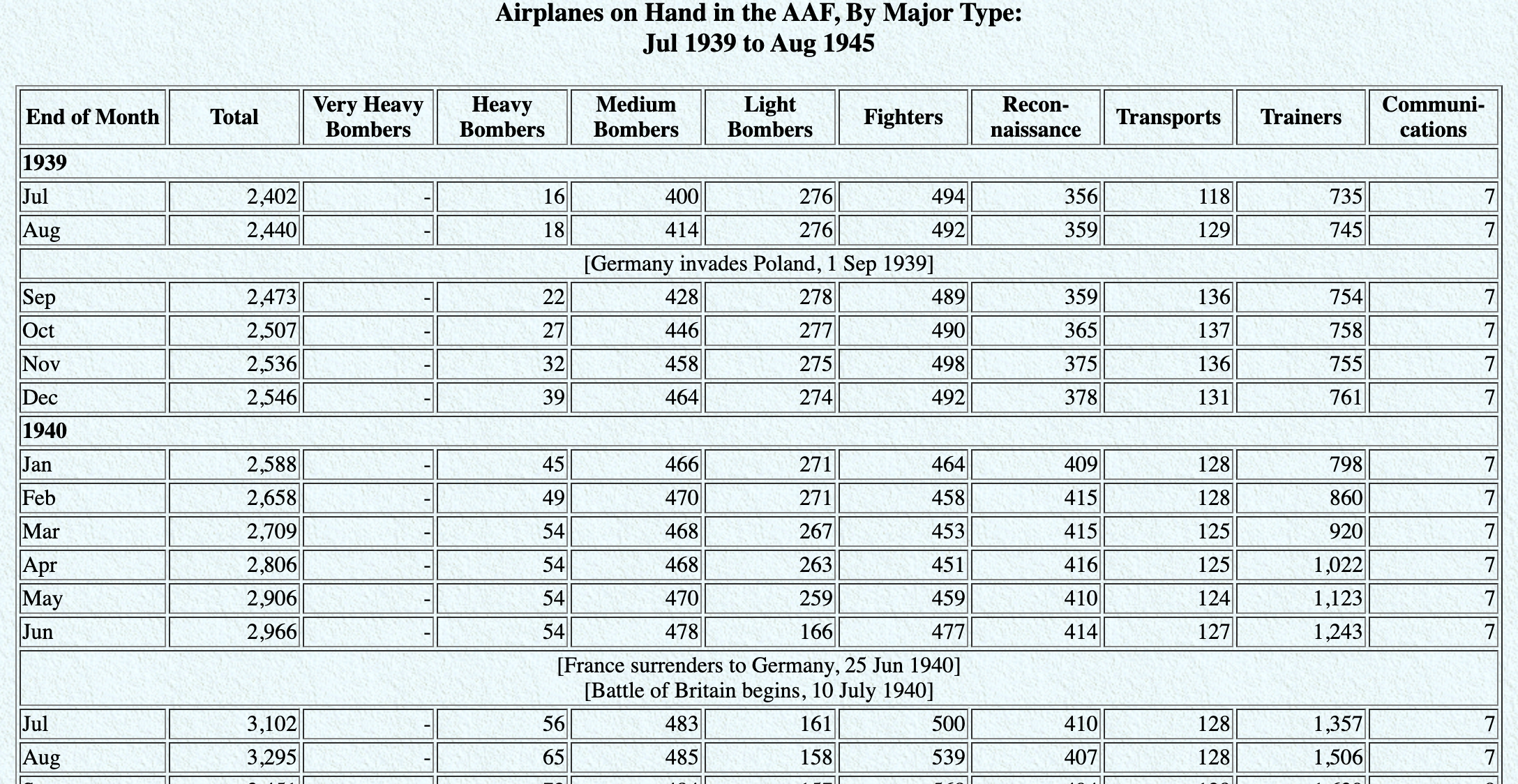
En quoi ces données ne sont pas tidy ?
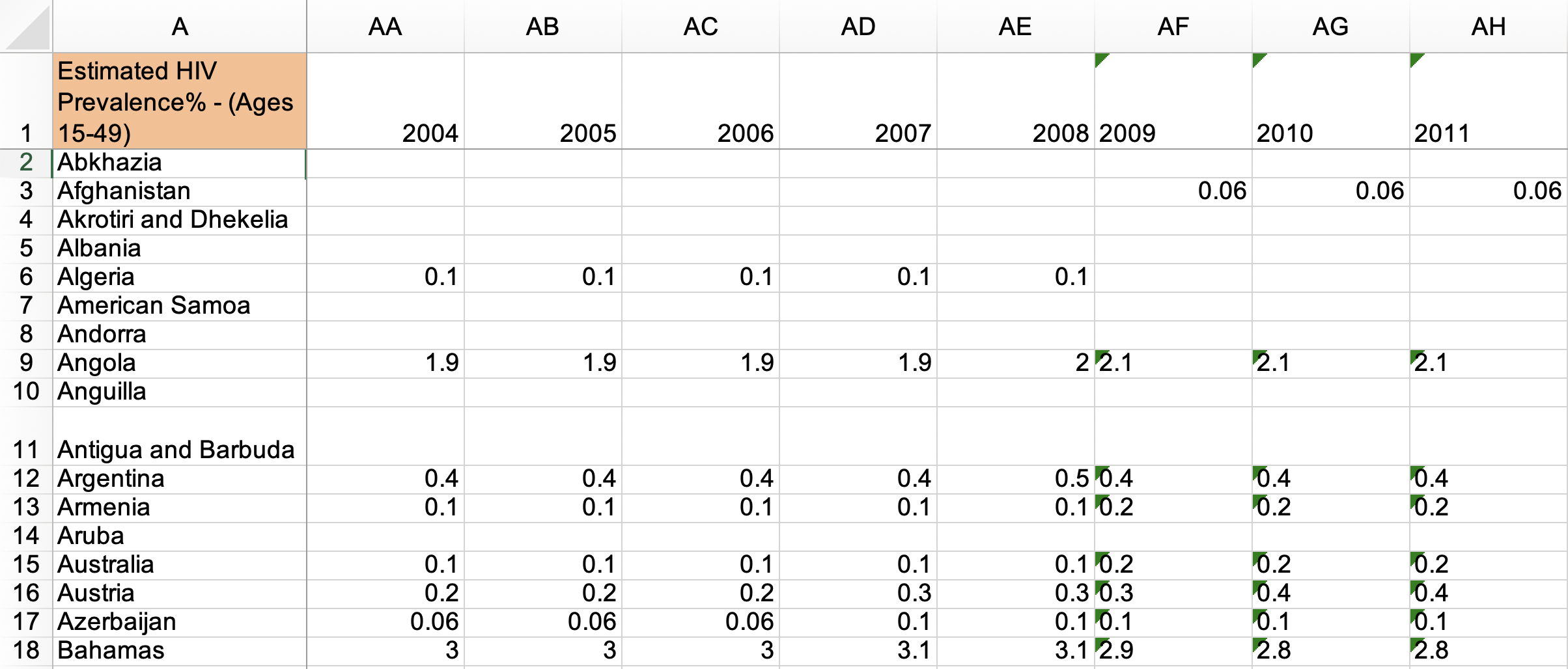
Source: Gapminder, Estimated HIV prevalence among 15-49 year olds
En quoi ces données ne sont pas tidy ?
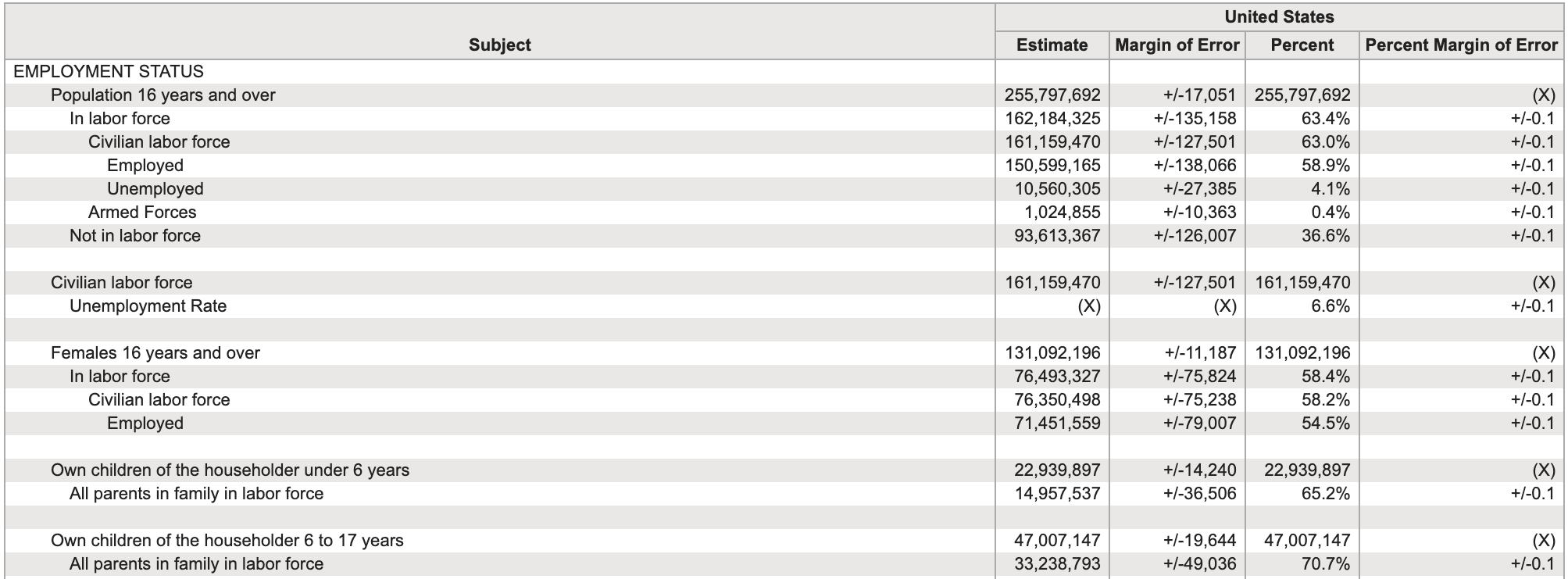
Source: US Census Fact Finder, General Economic Characteristics, ACS 2017
Tidying data
Ce qu’on a…
# A tibble: 2 × 4
  customer_id item_1 item_2       item_3
        <dbl> <chr>  <chr>        <chr>
1           1 bread  milk         banana
2           2 milk   toilet paper <NA>
Ce qu’on veut…
# A tibble: 6 × 3
  customer_id item_no item
        <dbl> <chr>   <chr>
1           1 item_1  bread
2           1 item_2  milk
3           1 item_3  banana
4           2 item_1  milk
5           2 item_2  toilet paper
6           2 item_3  <NA>
Pour Tidyer: Tidyr
Tidyr permet de transformer les données pour les Tidy :
- Faire pivoter les données
- Séparer ou combiner des colonnes
- Imbriquer/Désimbriquer des colonnes
- Préciser commenter traiter les
NA
Pivoter les données

Wide vs Long
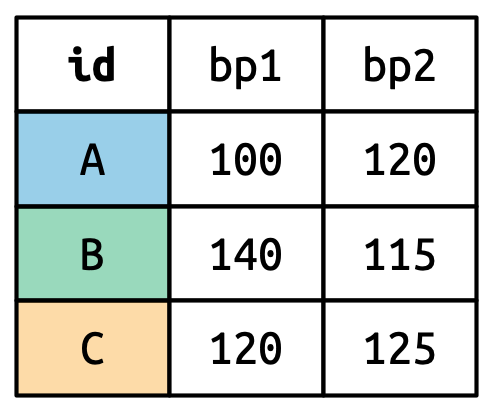
Forme large :
Forme longue :
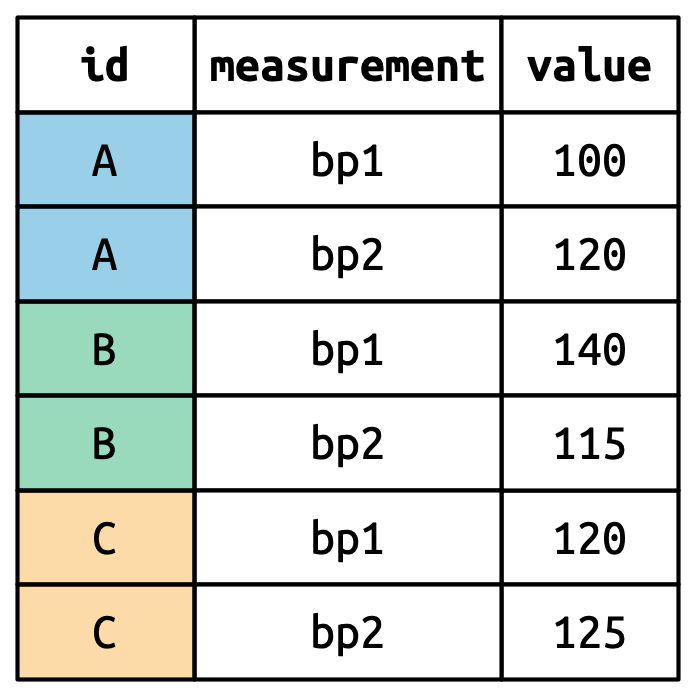
Source: (Wickham et al., 2023, chap. 5)
Wide vs Long
Wide
Plus de colonnes
# A tibble: 2 × 4
  customer_id item_1 item_2       item_3
        <dbl> <chr>  <chr>        <chr>
1           1 bread  milk         banana
2           2 milk   toilet paper <NA>
Long
Plus de lignes
# A tibble: 6 × 3
  customer_id item_no item
        <dbl> <chr>   <chr>
1           1 item_1  bread
2           1 item_2  milk
3           1 item_3  banana
4           2 item_1  milk
5           2 item_2  toilet paper
6           2 item_3  <NA>
pivot_longer()
- data : Comme d’habitude
- cols : Colonne à pivoter
- names_to : Nom de la colonne où les variables vont être envoyées
- values_to : Nom de la colonne où les valeurs vont être envoyées
pivot_longer(
  data,
  cols,
  names_to = "name",
  values_to = "value"
  )
Customer \(\rightarrow\) purchases
purchases <- customers %>%
  pivot_longer(
    cols = item_1:item_3,  # variables item_1 à item_3
    names_to = "item_no",  # Noms des colonnes -> dans une nouvelle colonne item_no
    values_to = "item"     # valeurs pour chaque colonne -> dans une nouvelle colonne item
    )

purchases
# A tibble: 6 × 3
customer_id item_no item
<dbl> <chr> <chr>
1 1 item_1 bread
2 1 item_2 milk
3 1 item_3 banana
4 2 item_1 milk
5 2 item_2 toilet paper
6 2 item_3 <NA> pivot_wider()
- data : Comme d’habitude
- names_from : Colonne contenant les noms de colonnes
- values_from : Colonne contenant les valeurs
Références
Wickham, H., Çetinkaya-Rundel, M. and Grolemund, G. (2023). R for Data Science (2nd ed.). O’Reilly Media, Inc. https://r4ds.hadley.nz/

PRO1036 - 04 | Tim Bollé